Statement
This article provides a step-by-step guide to building a USB device using ATMEGA328P microcontroller by leveraging V-USB library.
Acknowledgement
We would like to thank Christian Starkjohann and Objective Development Software GmbH for open-sourcing V-USB library. Anyone who likes V-USB projects is welcome to visit their website (V-USB).
This article outlines the changes we made to develop a Universal Serial Bus device. Viewing this page is free of charge.
Preparation
To start this project, we require the following components.
Components needed in this project

ATMEGA328P microcontroller
Quantity: 1
1uF capacitor
Quantity: 1
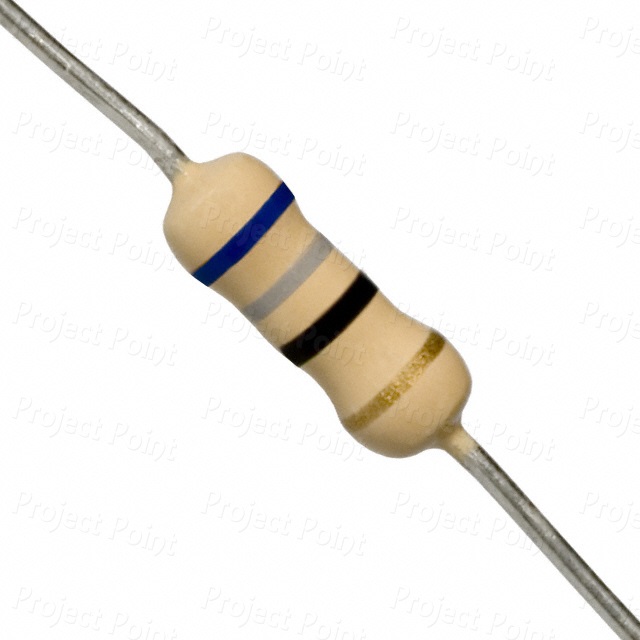
68ohm resistors
Quantity: 2
3.5V Zener diodes
Quantity: 2

22pF capacitors
Quantity: 2

16MHz crystal
Quantity: 1

USB Micro-B Connector Breakout Board
Quantity: 1

Jumper wires

USB Micro-B Connector Micro-B USB to USB Type-A cable
Quantity: 1

Breadboard
Quantity: 1
Software and library needed to compile V-USB custom HEX file
To compile a custom HEX file by using V-USB library with a personalized device name in Windows Device Manager, you need to download V-USB library and WinAVR IDE software from their respective official download pages.
Software
V-USB library
Utility and programmer needed to upload V-USB HEX file
To upload a V-USB HEX file to ATMEGA328P microcontroller, we’ll use to use avrdude utility included with the Arduino IDE, along with Arduino development board as the programmer.
Utility from Arduino IDE used to upload the HEX file
- avrdude
Arduino development board (used as a programmer)
- Arduino board (e.g. Arduino Uno)
Circuit construction
Schematic circuit of ATMEGA328P USB device

Circuit of ATMEGA328P USB device

Circuit of ATMEGA328P USB device when using Arduino Uno as a programmer

Script Compilation
First, extract V-USB zip file you downloaded. Next, create a new folder named AVR_USB. Then, move usbdrv folder into AVR_USB directory.
- AVR_USB
- usbdrv
- asmcommon.inc
- Changelog.txt
- CommercialLicense.txt
- License.txt
- oddebug.c
- oddebug.h
- Readme.txt
- usbconfig-prototype.h
- usbdrv.c
- usbdrv.h
- usbdrvasm.asm
- usbdrvasm.S
- usbdrvasm12.inc
- usbdrvasm15.inc
- usbdrvasm16.inc
- usbdrvasm18-crc.inc
- usbdrvasm20.inc
- usbdrvasm128.inc
- usbdrvasm165.inc
- USB-ID-FAQ.txt
- USB-IDs-for-free.txt
- usbportability.h
- usbdrv
After that, copy main.c and usbconfig.h from vusb-20121206\examples\hid-data\firmware to AVR_USB\usbdrv.
- vusb-20121206
- examples
- hid-data
- firmware
- main.c
- Makefile
- usbconfig.h
- firmware
- hid-data
- examples
- AVR_USB
- usbdrv
- asmcommon.inc
- Changelog.txt
- CommercialLicense.txt
- License.txt
- main.c
- oddebug.c
- oddebug.h
- Readme.txt
- usbconfig.h
- usbconfig-prototype.h
- usbdrv.c
- usbdrv.h
- usbdrvasm.asm
- usbdrvasm.S
- usbdrvasm12.inc
- usbdrvasm15.inc
- usbdrvasm16.inc
- usbdrvasm18-crc.inc
- usbdrvasm20.inc
- usbdrvasm128.inc
- usbdrvasm165.inc
- USB-ID-FAQ.txt
- USB-IDs-for-free.txt
- usbportability.h
- usbdrv
Then, remove the entire usbFunctionSetup and main functions in AVR_USB/usbdrv/main.c file.
main.c
/* ------------------------------------------------------------------------- */

usbMsgLen_t usbFunctionSetup(uchar data[8])
{
usbRequest_t    *rq = (void *)data;

    if((rq->bmRequestType & USBRQ_TYPE_MASK) == USBRQ_TYPE_CLASS){    /* HID class request */
        if(rq->bRequest == USBRQ_HID_GET_REPORT){  /* wValue: ReportType (highbyte), ReportID (lowbyte) */
            /* since we have only one report type, we can ignore the report-ID */
            bytesRemaining = 128;
            currentAddress = 0;
            return USB_NO_MSG;  /* use usbFunctionRead() to obtain data */
        }else if(rq->bRequest == USBRQ_HID_SET_REPORT){
            /* since we have only one report type, we can ignore the report-ID */
            bytesRemaining = 128;
            currentAddress = 0;
            return USB_NO_MSG;  /* use usbFunctionWrite() to receive data from host */
        }
    }else{
        /* ignore vendor type requests, we don't use any */
    }
    return 0;
}

/* ------------------------------------------------------------------------- */

int main(void)
{
uchar   i;

    wdt_enable(WDTO_1S);
    /* Even if you don't use the watchdog, turn it off here. On newer devices,
     * the status of the watchdog (on/off, period) is PRESERVED OVER RESET!
     */
    /* RESET status: all port bits are inputs without pull-up.
     * That's the way we need D+ and D-. Therefore we don't need any
     * additional hardware initialization.
     */
    odDebugInit();
    DBG1(0x00, 0, 0);       /* debug output: main starts */
    usbInit();
    usbDeviceDisconnect();  /* enforce re-enumeration, do this while interrupts are disabled! */
    i = 0;
    while(--i){             /* fake USB disconnect for > 250 ms */
        wdt_reset();
        _delay_ms(1);
    }
    usbDeviceConnect();
    sei();
    DBG1(0x01, 0, 0);       /* debug output: main loop starts */
    for(;;){                /* main event loop */
        DBG1(0x02, 0, 0);   /* debug output: main loop iterates */
        wdt_reset();
        usbPoll();
    }
    return 0;
}

/* ------------------------------------------------------------------------- */
After that, create AVR_USB.c and Makefile files. Their content is as follows.
AVR_USB.c
#include<avr\io.h>
#include<avr\interrupt.h>
#include "usbdrv\usbdrv.h"
#include "usbdrv\usbdrv.c"
#include "usbdrv\main.c"

unsigned char a[4]={11,22,33,44}; //This is data to be sent
int main(void)
{
    usbInit(); //initialize USB parameters
	usbDeviceConnect();
    sei();     //allow interrupt
    while(1)
    {
      usbPoll(); //This must be in the main method, execution time interval cannot be greater than 50ms
    }
    return 0;
}

usbMsgLen_t usbFunctionSetup(uchar data[8]) //USB request is processed here.
{
  if(data[1]==0x3c)
  {
    usbMsgPtr = a; //The request content is 0x3c, sent data
    return 4;
  }
  else
  {
    return 0;//if no, don't sent data
  }
}
Makefile
# WinAVR cross-compiler toolchain is used here
CC = avr-gcc
OBJCOPY = avr-objcopy

# If you are not using ATtiny2313 and the USBtiny programmer,
# update the lines below to match your configuration
CFLAGS = -Wall -Os -I usbdrv -mmcu=atmega328p
OBJFLAGS = -j .text -j .data -O ihex

SRC=AVR_USB

# Object files for the firmware (usbdrv/oddebug.o not strictly needed I think)
OBJECTS = usbdrv/oddebug.o usbdrv/usbdrvasm.o $(SRC).o

all: $(SRC).hex

# From .elf file to .hex
%.hex: %.elf
	$(OBJCOPY) $(OBJFLAGS) $< $@

# Main.elf requires additional objects to the firmware, not just main.o
$(SRC).elf: $(OBJECTS)
	$(CC) $(CFLAGS) $(OBJECTS) -o $@

# Without this dependance, .o files will not be recompiled if you change
# the config! I spent a few hours debugging because of this...
$(OBJECTS): usbdrv/usbconfig.h

# From C source to .o object file
%.o: %.c
	$(CC) $(CFLAGS) -c $< -o $@

# From assembler source to .o object file
%.o: %.S
	$(CC) $(CFLAGS) -x assembler-with-cpp -c $< -o $@

# for uncompatino
flush:
	sudo ~/src/avrdude-5.8/avrdude -c diecimila -C ~/src/avrdude-5.8/avrdude.conf -p atmega328p -e -U flash:w:$(SRC).hex -P ft0 -v -v
The changes in the directory are as follows:
- AVR_USB
- Makefile
- AVR_USB.c
- usbdrv
- asmcommon.inc
- Changelog.txt
- CommercialLicense.txt
- License.txt
- main.c
- oddebug.c
- oddebug.h
- Readme.txt
- usbconfig.h
- usbconfig-prototype.h
- usbdrv.c
- usbdrv.h
- usbdrvasm.asm
- usbdrvasm.S
- usbdrvasm12.inc
- usbdrvasm15.inc
- usbdrvasm16.inc
- usbdrvasm18-crc.inc
- usbdrvasm20.inc
- usbdrvasm128.inc
- usbdrvasm165.inc
- USB-ID-FAQ.txt
- USB-IDs-for-free.txt
- usbportability.h
If you wish to change the device description name of USB device, please change the configuration line accordingly.
AVR_USB/usbdrv/usbconfig.h
#define USB_CFG_DEVICE_NAME     'Y', 'A', 'R', 'D', 'V', 'I', 'S', 'I', 'O', 'N'
#define USB_CFG_DEVICE_NAME_LEN 10
You also need to update the following configuration lines.
The value of USB_CFG_CLOCK_KHZ is set to 16000, corresponding to 16MHz crystal we used in the circuit. If you’re using a crystal with a different frequency, please change USB_CFG_CLOCK_KHZ value accordingly.
AVR_USB/usbdrv/usbconfig.h
#define USB_CFG_CLOCK_KHZ 16000#define USB_CFG_DEVICE_ID 0xDC, 0x05Next, open AVR_USB.c in Programmer’s Notepad [WinAVR]. Click Tools, followed by [WinAVR] Make All to build the project.


Script Uploading
To upload the hex file to ATMEGA328P, we use Arduino Uno as the programmer. Please refer to this schematic circuit .
Before executing this command in Windows Command Prompt, ensure the following:
- Arduino IDE is installed on your PC.
- Locate Arduino IDE installation directory.
- Replace the placeholders in the command:
- [Drive:] -> your actual drive letter where Arduino IDE is installed.
- [Arduino folder] -> the name of Arduino IDE installation folder.
- [COM_Number] -> COM port number assigned to your Arduino board.
- [HEX file directory] -> the full path to HEX file you want to upload.
[Drive:][Arduino folder]\hardware\tools\avr/bin/avrdude -C[Drive:][Arduino folder]\hardware\tools\avr/etc/avrdude.conf -v -patmega328p -cstk500v1 -PCOM[COM_Number] -b19200 -Uflash:w:[V-USB hex file directory]:i For example,
D:\Arduino\hardware\tools\avr/bin/avrdude -CD:\Arduino\hardware\tools\avr/etc/avrdude.conf -v -patmega328p -cstk500v1 -PCOM7 -b19200 -Uflash:w:D:\AVR_USB\AVR_USB.hex:i Device Test
After uploading V-USB HEX file to ATMEGA328P using Arduino board as the programmer, connect USB Micro-B Connector Breakout Board to your laptop via a USB cable. Once connected, a new USB device should appear in Windows Device Manager.
New USB device in device manager
